Click rates in phishing simulations: when is it a good result, and when is it a false sense of security?
Phishing simulations are a standard part of many security awareness programmes. The aim is to keep employees vigilant and alert to real phishing emails. On the one hand, you want a credible phishing simulation that employees might be tempted to click on, while on the other, you hope they are alert enough not to take the bait. So, what is a healthy click rate for a phishing simulation? And is a high click rate necessarily a bad thing?
In this article, we answer these questions and show you that a phishing simulation is much more than simply a tool for measuring click rates.
A ‘successful’ phishing simulation mimics a credible phishing email and contains elements that real cybercriminals also use to deceive people. In this sense, it measures employees’ vigilance and provides an indication of how resilient your organisation is to phishing. :contentReference[oaicite:0]{index=0}
It is important for your phishing simulation to look credible. These days, very few people still fall for the classic email from a Nigerian prince who urgently needs help moving his fortune. At the same time, your phishing simulation should not be overly personal or touch on sensitive issues. After all, you want to maintain employee support for your security awareness programme.
Manipulation factors play an important role in phishing simulations. Certain psychological triggers increase the likelihood that someone will click on a link or attachment. Three key factors are:
Cybercriminals are well aware of these psychological techniques and deliberately exploit them. That is why it is important to prepare employees for these methods of manipulation. Regularly run realistic phishing simulations that use these manipulation factors and follow them up with relevant training modules.
Disclaimer: The click-through rates shared in this article are based on our anonymised database of phishing simulations used as baseline assessments.The English saying ‘curiosity killed the cat’ is particularly fitting when it comes to phishing. Figures from our anonymised database show that phishing emails that appeal to people’s curiosity generate the most clicks. Below, we share a few examples of emails that exploit our naturally curious nature:

Would you find the email above credible enough to click on? 37% of Awaretrain users did. This makes it one of our most successful phishing templates when it comes to generating a high number of clicks. The email plays on curiosity by mentioning a change to the staff regulations. Positive human traits, such as curiosity and a willingness to follow instructions, can be exploited by cybercriminals.
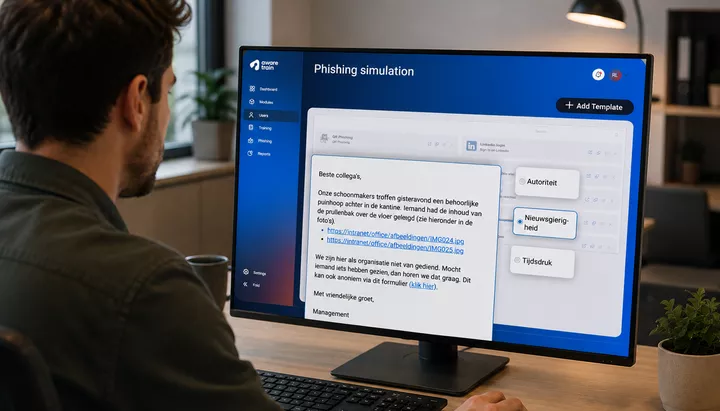
The next email, about an incident in the canteen, is a worthy runner-up in the curiosity category, with a click rate of 24%. It has a greater shock factor than the first email. The message raises questions, while the addition of photos makes it particularly tempting to take a quick look at the aftermath.

(Phishing) emails that appear to come from someone in a position of authority often work well because of the power dynamic involved. The email may appear to come from the CEO, a member of management or the HR department. Authority can also be combined with another factor, such as curiosity, to further increase the click rate.
Take the phishing simulation below. With a click rate of 22%, it is a good example of an email that uses authority to manipulate people. The ‘important announcement’ sounds very official, particularly because the recipient is asked to schedule an appointment.

Combined with spear phishing, this tactic can also prove highly effective for cybercriminals. An organisation holds a great deal of information about you. When an apparent ‘HR department’ uses accurate and credible information, it makes the email more convincing. Although cybercriminals may use this phishing tactic, it is wise to be cautious when using it in simulations. The aim is not to trick or embarrass someone by exploiting sensitive topics.
Time pressure is an important factor in phishing simulations, as people are more likely to click when they feel under pressure. When something needs to be dealt with quickly, there is less time to stop, think and check the email properly.
The click rate for this type of phishing simulation also depends on when the simulation is sent. At the end of the working day, people tend to be less alert, and some colleagues may already have gone home, making it more difficult to verify whether the email is legitimate. Friday afternoon – or the day before the weekend begins within your organisation – can also be a vulnerable time. When people are wrapping up their final tasks, they may overlook the warning signs, resulting in a higher click rate.
Take the phishing simulation below, for example. It announces a switch to a new system for submitting leave requests and asks employees to take action within three days. With a click rate of 27%, this simulation generates a considerable number of clicks.

Now for the key question: what constitutes a good click rate, and at what point should you start to worry? Unfortunately, there is no single percentage that provides the answer. In practice, it depends on:
Click rates tell you a lot, but they do not tell you everything. A low click rate does not necessarily mean that employees would report a suspicious email or that they are genuinely resilient to phishing. This does not make phishing simulations pointless; rather, it shows why they need to form part of a broader security awareness approach.
That is why, alongside phishing simulation click rates, it is important to look at:
Ultimately, you can only draw meaningful conclusions about phishing simulations once you have conducted several of them. We recommend running between four and six simulations per year. This gives you enough results to analyse while keeping employees sufficiently aware without overwhelming them.
You can then ask questions such as: are click rates different now compared with a year ago? Can you see a change in employee behaviour? You may also notice changes outside the security awareness platform, such as employees reporting more suspicious emails or talking more frequently about phishing and information security.
Keep employees alert and aware with the Netherlands’ leading security awareness platform: Awaretrain. Gain insight into and control over safer clicking behaviour with our phishing simulations and security awareness training. Based on behavioural science principles, our interactive training courses and proven phishing simulations help you engage employees and encourage lasting behavioural change.
Depending on your security awareness needs, we offer several options for phishing simulations:
Try Awaretrain for free for 28 days: the security awareness platform with phishing simulations.

Training modules
Customers worldwide
Employees trained

Step aboard and build lasting security awareness with Awaretrain.